Most email users rely on Gmail or Yahoo for their daily communications. These services are free, convenient, and integrate seamlessly with other platforms.
However, many users don’t realize that Google is scanning their emails using AI technology. Google turns this scanning on by default, which means it may analyze your data unless you manually change your settings. This is happening without clear knowledge for users.
In this guide, you’ll learn how to review and adjust those settings. We will also compare the benefits of private email services versus Gmail and Yahoo Mail. This will demonstrate why transitioning to a secure inbox like MySudo® matters now more than ever.
The hidden truth about Google AI email scanning
In 2026, privacy concerns around email have reached new heights. Google’s AI scans and analyzes your emails for things like targeted ads and improving its systems. Google says this improves your experience, but many users feel surprised when they learn it exists — and that Google turns it on by default.
What does this mean for you? Artificial intelligence reads, analyzes, and processes every email you send and receive through Gmail.
This may include:
- Online shopping receipts and order confirmations
- Purchase history and transaction details
- Subscription renewals and billing notices
- Promotional offers and discount codes
- Shipping updates and delivery confirmations
How to turn off Google AI email scanning in Gmail (step-by-step)
While you can’t completely disable all AI scanning in Gmail, you can reduce how your email data is used for smart features and personalization by adjusting your settings.
Step 1: Open Gmail settings
- Sign in to your Gmail account.
- In the top-right corner, click the Settings (gear) icon.
- Select See all settings.
Step 2: Turn off smart features in Gmail
- In the General tab, scroll down to Smart features.
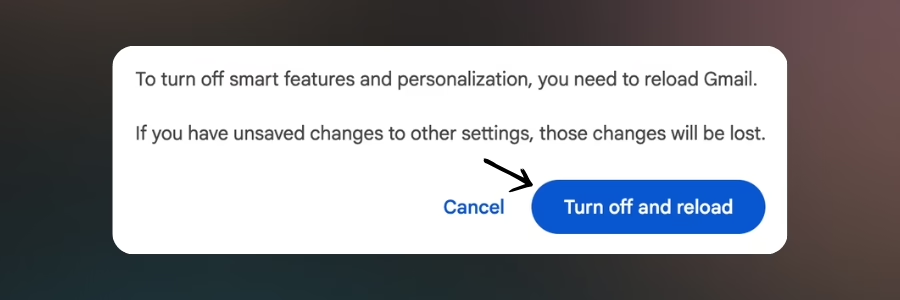
- Toggle off Smart features and confirm your choice when prompted.
- Google will close and reload Gmail for the changes to take effect.
Step 3: Turn off Google workspace smart features
- Return to Settings in Gmail.
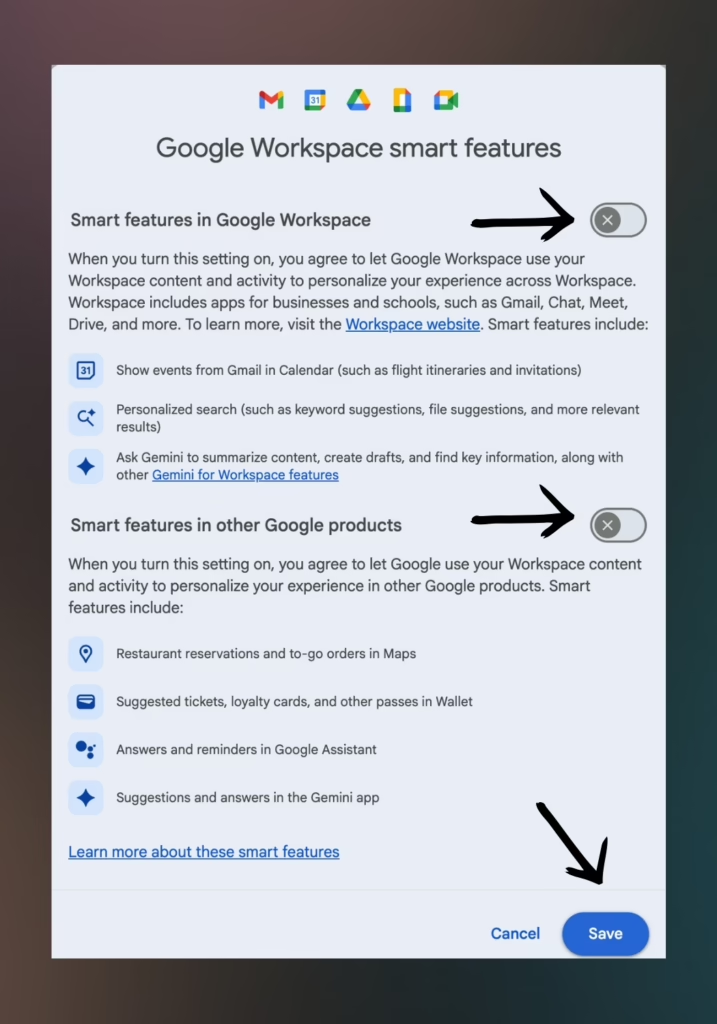
- In the General tab, scroll to Google Workspace smart features.
- Click Manage Workspace smart feature settings.
- Toggle off both available options.
- Click Save to apply your changes.
Important note: Even with these settings disabled, Google still scans your emails for security purposes, spam detection, and service functionality. Complete privacy requires a truly different approach to email.
Gmail vs private email: The real differences
When you compare a secure email inbox to Gmail or Yahoo, the differences go well beyond AI scanning. Here’s what sets privacy-focused email services apart:
Data collection philosophy
- Gmail/Yahoo: Your data is the product. These services are free because they monetize your personal information through advertising and data analytics.
- MySudo: Privacy-first approach. You’re the customer, not the product. No ads, no data mining, no third-party access.
Encryption standards
- Gmail/Yahoo: Emails are encrypted in transit but stored unencrypted on servers, allowing the provider to read your messages.
- MySudo: When you email other MySudo users, end-to-end encryption ensures only you can access your email content. Even MySudo can’t read your messages.
Identity protection
- Gmail/Yahoo: One email address linked to your identity, creating a lasting digital footprint across everything you do online.
- MySudo: Create multiple email identities (Sudos) for different purposes—work, shopping, social media—keeping your personal information separate and protected.
Why MySudo email is the secure email inbox you need
MySudo offers a comprehensive private email solution designed for the privacy-conscious user. Unlike Gmail or Yahoo, MySudo puts your security and privacy first. Here’s what makes MySudo different:
Complete privacy features
- Custom Folders: Organize emails by identity or purpose, keeping personal and professional communications separate.
- Scheduled Send: Send emails at the perfect time without compromising your privacy.
- Editing Tools: Draft, revise, and polish messages with full-featured editing capabilities.
- Custom Signatures: Personalize each identity’s outgoing mail to maintain professionalism across different Sudos.
- Mark as Spam/Block Senders: Keep your inbox clean and secure with advanced spam protection.
- Compartmentalization: Create separate identities for work, shopping, or personal use, preventing data brokers from building a complete profile of you.
- App-Only Access: Private and secure access exclusively through MySudo mobile or desktop applications, with no web interface that could be compromised.
Free email, different values: MySudo vs Gmail
Both Gmail and MySudo offer free email services, but there’s a crucial difference in how they operate. With Gmail and Yahoo, you’re trading your privacy for convenience—your data becomes the product. MySudo’s free plan includes up to three secure email inboxes without compromising your privacy. Here’s what you should know:
- Your email content trains AI models that may be used for purposes you never consented to
- Government agencies can request access to your email without your knowledge through legal processes
- A single data breach could expose years of personal communications and sensitive information
- Your email address becomes a permanent identifier linking all your online activities together
Making the switch: Is private email right for you?
Switching from Gmail or Yahoo to a private email service like MySudo is easier than you think—and it’s free.
MySudo’s free plan includes a secure email inbox with all the privacy features you need. You don’t have to abandon your existing email immediately, you can slowly make the switch. Many users start by creating a MySudo email for specific purposes:
- Online Shopping: Use a dedicated Sudo for retail purchases to prevent tracking and reduce spam.
- Financial Services: Keep banking and investment communications completely separate and secure.
- Healthcare: Protect sensitive medical information with a HIPAA-grade secure email.
- Professional Networking: Maintain a professional identity without exposing your personal email.
- Social Media: Sign up for platforms without connecting them to your main identity.
Frequently asked questions
Can I use MySudo with my existing contacts?
Absolutely. MySudo email works with any email address, just like Gmail or Yahoo. Your contacts don’t need to use MySudo to communicate with you securely.
Is MySudo actually free?
Yes! MySudo offers a free plan that includes a secure email inbox with privacy-first features. Unlike Gmail, which monetizes your data to offer “free” service, MySudo’s free plan is genuinely free—no data mining, no ads, no credit card required. You can upgrade for additional features, but the free plan provides everything you need for private email.
Will MySudo email work on my devices?
Yes. MySudo offers both mobile apps (iOS and Android) and desktop applications, ensuring you can access your secureemail inbox wherever you are.
How many email identities can I create?
With MySudo, you can create up to nine Sudos, each with its own email inbox. This allows you to separate different aspects of your digital life for maximum privacy.
Is MySudo actually more secure than Gmail?
Yes. While Gmail offers security features like two-factor authentication, it still scans and analyzes your email content. MySudo uses end-to-end encryption and doesn’t have access to read your messages, truly making it more private.
Take control of your email privacy today
The debate between private email vs Gmail comes down to one simple question: Do you value your privacy? While services like Gmail and Yahoo offer convenience, they do so at the expense of your personal data. With Google AI email scanning enabled by default and minimal options to disable it, your most private communications are being analyzed, processed, and potentially monetized.
MySudo provides a free secure email inbox that puts you back in control. With features designed for privacy, security, and compartmentalization, MySudo isn’t just an email service—it’s a complete privacy solution for the modern digital world.
Don’t wait for the next data breach or privacy scandal. Download MySudo’s free app today and get your secure email inbox in minutes.