Phishing is one of those sneaky cyberattacks where criminals pretend to be someone you know or trust so they can trick you into giving up sensitive information—things like your login details, financial information, or personal data. You’ve probably seen it show up in emails, texts, or even phone calls. Instead of hacking into systems, phishing works by taking advantage of human trust, and it’s sadly very effective.
In fact, phishing was the most common cause of all credential-based data breaches in 2024, costing people and businesses billions (Verizon DBIR, 2024). In this article, we’ll explore what phishing is, where it came from, how it works, the damage it causes, and—most importantly—how you can spot it and protect yourself.
Phishing is a type of social engineering attack, which basically means attackers are manipulating people instead of exploiting software bugs. The attacker pretends to be a legitimate organization, like a bank, retailer, or government agency, and sends fraudulent messages that look official. The aim is usually to steal passwords, credit card numbers, or even install malicious software such as ransomware.
What makes phishing so tricky is that it plays on psychology. Messages often use urgency, fear, or curiosity to push someone into acting fast. For example, a phishing email might claim your account has been locked and you need to log in immediately. In 2024, the FBI’s Internet Crime Complaint Center (IC3) logged over 193,000 phishing-related complaints, with reported losses topping $70 million (IC3 2024).
Phishing also ties into bigger problems like identity theft, fraud, and malware distribution.
Early Beginnings (1990s)
The word “phishing” popped up in 1996, inspired by the idea of “fishing”—using bait to catch victims. Back then, early phishers targeted AOL users, pretending to be AOL staff to trick people into handing over account details. These early scams were pretty simple but worked because most people were brand new to the internet and didn’t know to be suspicious.
Evolution (2000s–2010s)
By the 2000s, phishing had leveled up. Attackers started going after financial institutions and e-commerce platforms, taking advantage of the boom in online banking. Fake PayPal or Citibank emails became common. In 2003, a big phishing campaign against eBay showed just how widespread these scams could be.
As time went on, phishing spread beyond email. Text message scams (“smishing”) and fake phone calls (“vishing”) started popping up. Attackers also began tailoring their scams more carefully with spear phishing—personalized attacks built using information from social media or stolen data. Between 2016 and 2019, one version of spear phishing called business email compromise (BEC) internationally cost companies $26.2 billion USD (Internet Crime Complaint Center).
Modern Era (2020s)
These days, phishing has gotten both high-tech and harder to spot. Criminals use artificial intelligence (AI) to write emails that look flawless, while deepfake audio and video make fake phone calls eerily convincing. In 2024, 80% of phishing campaigns used HTTPS-encrypted websites to look more legitimate (Hoxhunt). Add in the rise of remote work and mobile devices, and the attack surface has grown dramatically.
Even though phishing can take many forms, the process usually follows a familiar pattern:
Bait Creation – The attacker creates a convincing message that looks real. It might include a logo, familiar wording, or even spoofed contact info.
Delivery – That message gets sent by email, text, phone, or social media. Some attacks are sent out to thousands, while spear phishing goes after just one person or company.
Engagement – The victim is nudged into acting—clicking a link, typing credentials into a fake website, or downloading an attachment.
Exploitation – Once the victim takes the bait, attackers can steal data, commit fraud, or deploy malware like ransomware. Sometimes this gives them a foothold into entire corporate networks.
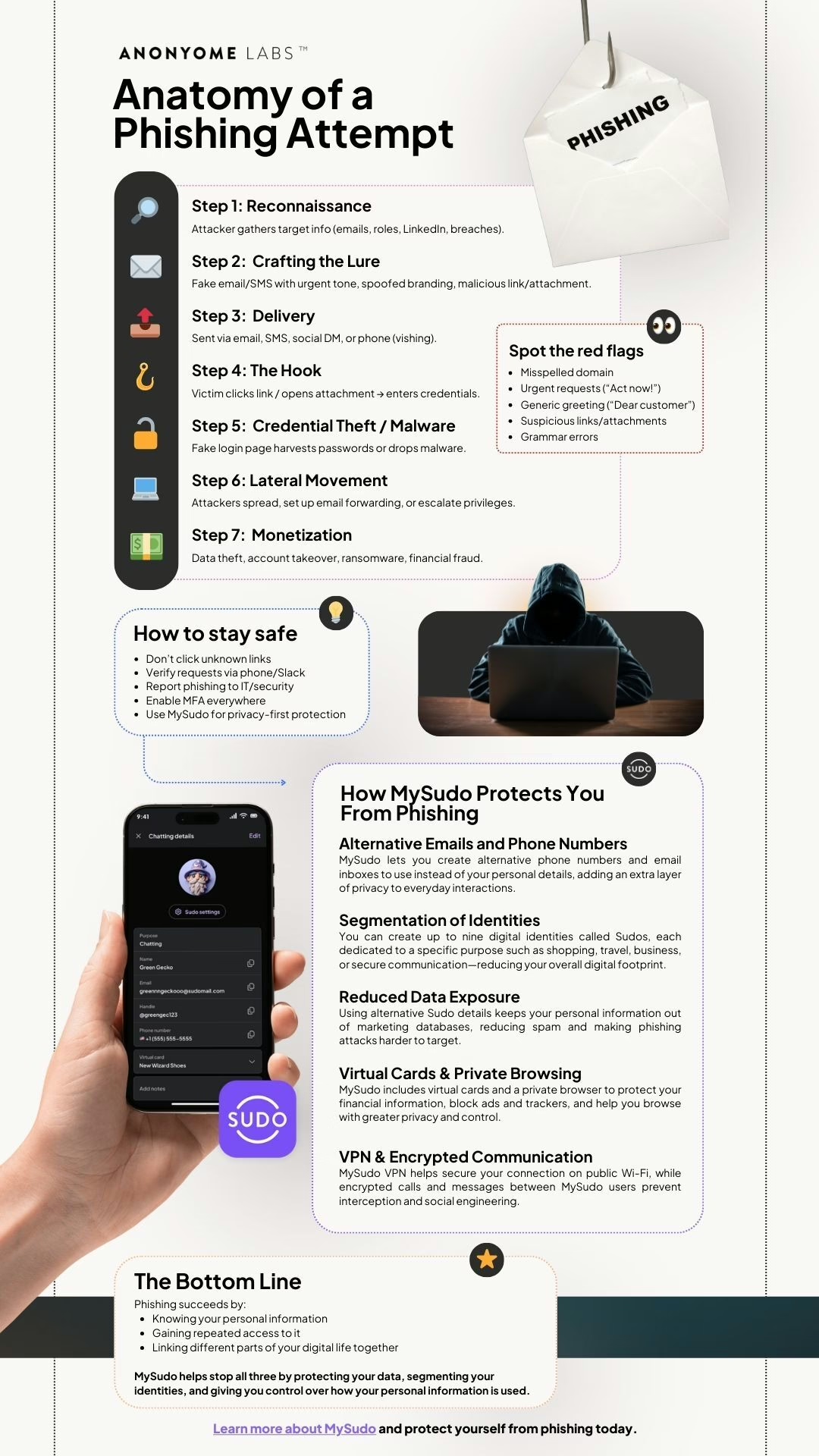
Checkout our infographic on the anatomy of phishing attempts. See what to look out for with phishing attempts and some ways you can keep yourself safe.
Phishing may start small, but the fallout can be major:
Phishing is more than just an individual problem—it undermines trust in digital systems for everyone. Small businesses are often hit hardest, being 350% more likely to experience phishing attacks (Barracuda). Meanwhile, big industries like healthcare and government face serious disruptions, as seen in the infamous 2020 Anthem Inc. breach, which began with a phishing attack and resulted in 78.8 million records stolen (HIPAAJournal).
On the economic side, phishing fuels a massive underground market. Stolen data often ends up on dark web marketplaces, where hackers pay an average price of $17.36 USD for a credit card number, CVV, expiration date, cardholder name, and postal code (Comparitech).
Stopping phishing isn’t about one magic fix—it takes a mix of awareness and tools:
Start safeguarding your digital identity today with these simple, effective steps:
Check Sender Details: Verify email addresses and phone numbers before clicking links.
Enable Two-Factor Authentication (2FA): Add an extra layer of security to your accounts.
Hover, Don’t Click: Mouse over links to reveal their true URLs before interacting.
Update Software Regularly: Keep your apps and devices patched to block vulnerabilities.
Use Privacy Tools: Apps like MySudo create virtual emails and numbers to shield your real identity.
At Anonyome Labs, we focus on building tools that help protect privacy and reduce exposure to phishing. Our MySudo app lets you create virtual emails, phone numbers, and payment methods—so even if a phishing attempt comes your way, your real identity stays safe.
Want to see how it works? Discover how MySudo protects your digital identity.
Phishing