Every time you buy something, open an account, search the internet, interact on social media, and use smart devices, public Wi-Fi, and AI, you leave a trail of personal information or “personal data” that is being collected, shared, used, and abused. Suddenly you’re getting spam calls, phishing emails, smishing texts, and data breach alerts, all while someone is booking flights to Ibiza with your credit card and taking out mortgages in your name!
In 2026, our digital footprints are vast and vulnerable, and online privacy is an urgent issue.
This guide covers everything you need to know about data privacy and data protection:
- What is personal data?
- What is a digital footprint?
- What is online privacy and why does it matter?
- Who is tracking you online and why?
- What criminals can do with your personal data
- What is a data breach?
- AI and privacy
- Children’s data privacy online
- Data privacy laws in 2026: quick summary
- How to stop companies tracking you (prioritized action list)
- How to stop data brokers selling your information
- What is a VPN and do you need one?
- How to improve browser privacy and stop online tracking
- How to create strong passwords and manage them safely
- What is 2FA and should you use it?
- Social media privacy settings: a platform-by-platform guide
- How to protect yourself from identity theft and deepfakes
- Best privacy apps and tools 2026
- How MySudo can help protect your online privacy in 2026
What is personal data?
Personal data is any piece of information that relates to you as an individual: anything that could be used to identify who you are, where you are, what you do, or what you’re like.
Some of it is obvious: your name, your home address, your date of birth, your email address, your phone number, and your SSN, passport and driver license numbers. But a lot of it is less obvious than you’d expect. Your IP address is personal data, and so is your location history, browsing history, purchase history, the photos you appear in, your voice, your face, your fingerprints and x-rays, your vehicle registration number or title number, your mother’s maiden name, and even the device you’re using to read this.
The simplest way to think about it is if a piece of information could be used either on its own or combined with other information to identify, locate, or build a picture of you as a specific person, it’s personal data.
Personal data is valuable. It tells companies what you want to buy, what you believe, who you know, how much you earn, and what you’re worried about. That makes it something worth collecting, trading, and – in the wrong hands – exploiting.
Personally identifiable information (PII) is the technical term for personal data. See the complete list of what is officially considered PII in the US.
What is a digital footprint?
Your digital footprint is the trail of data you leave behind every time you do something online. It’s sometimes called your digital exhaust because, just as engine exhaust is residue from using a car, digital exhaust is residue from using the internet. Your digital footprint contains all that personal data we just discussed.
Every website you visit, every search you run, every post you like, every app you open, every purchase you make, and every location you visit with your phone in your pocket adds another trace to that trail. Most of it happens without you actively doing anything: your devices are quietly logging and transmitting data in the background while you get on with your day.
The result is a detailed, persistent record of who you are, what you do, and what you’re interested in. You don’t own this record, you can’t fully see it, and in most cases you can’t delete it.
What is online privacy and why does it matter?
You might say, “I have nothing to hide,” or “Privacy tools are only for criminals,” but online privacy (also called data privacy) is about your right to control your personal information and how it’s used.
Data privacy matters because it protects your fundamental right to privacy and:
- It protects you from direct harm. Stolen personal data enables identity theft, financial fraud, blackmail, and scams. These crimes happen to millions of people every year and can take years to recover from.
- It limits who has power over you. The more data companies and governments hold about you, the more leverage they have. That data determines whether you get a loan, what price you’re charged for insurance, whether your job application makes it past the first filter, and what content you’re shown. Decisions that affect your life are being made about you, using your data, without your knowledge or input.
- It protects your autonomy. When AI systems know your habits, fears, and desires better than you do, they can predict and shape your behavior. That’s the business model of every major social media platform. Targeted content, addictive design, and personalized advertising are all built on the ability to influence you using your own data against you.
- It preserves your freedom to think and act without being watched. People behave differently when they know they’re being observed. Mass surveillance, whether by corporations or governments, has a chilling effect on free speech, political dissent, and personal expression, even among people who have done nothing wrong. Privacy isn’t about having something to hide. It’s about having the space to think, question, and exist without being monitored.
- It protects the people around you. Your data doesn’t just reveal things about you; it reveals things about your family and friends and anyone else connected to you. Sharing your location, contacts, or communications affects other people’s privacy too, whether they consented or not.
- It becomes more important over time. Data collected today doesn’t disappear. It can be stored indefinitely, repurposed, sold, leaked, or handed to a future government with very different intentions from the one that collected it. The privacy decisions you make now follow you around.
The “nothing to hide” argument oversimplifies the issue. Privacy isn’t a guilty person’s shield; it’s a condition for living freely. Every major human rights framework in the world recognizes it as a fundamental right and for good reason.
Who is tracking you online and why
Our digital world is so reliant on user data that there are even terms for it: surveillance capitalism and the data economy. Just about every entity you can think of has their fingers in the “personal data pie”, including:
- Tech and social media companies like Google, Meta, Apple, Microsoft, Amazon, TikTok, X, Snapchat, LinkedIn, YouTube, which sell your attention to advertisers and control what content you see
- Data brokers like Acxiom, LexisNexis, Equifax, TransUnion, Oracle Data Cloud, which package and resell your profile to anyone willing to pay, from insurers to political campaigns
- Advertisers and ad networks like Google Ads, Meta Audience Network, and The Trade Desk, which target you with personalized ads based on your behavior, location, and interests
- Financial institutions like banks, credit card companies, insurers, and fintech apps, which use your information to assess risk, detect fraud, and identify opportunities to sell you more products
- Retailers and e-commerce sites, loyalty programs, and payment processors, which use data to predict your purchasing behavior, personalize offers, and optimise pricing
- Healthcare providers such as hospitals, health apps, wearables like Fitbit, Apple Health, and Garmin, which use customer data to deliver services, but also increasingly to share data with insurers and pharmaceutical companies
- Employers, which gather data through things like productivity monitoring software and HR platforms to track performance, manage liability, and make hiring and firing decisions
- Governments and law enforcement, which gather data via direct surveillance and requests to tech companies to monitor citizens, investigate crimes and, in some countries, suppress dissent
- Internet service providers (ISPs), which use customer data to sell anonymised browsing data to advertisers and comply with government surveillance requests
- Connected/smart device and car manufacturers, which collect behavioral data from inside your home and vehicle and sell insights to third parties
- AI companies like OpenAI, Anthropic, and Google DeepMind, which use data to train and improve their models and power personalized products and services.
Let’s look closer at some of these:
Tech and social media companies
Tech companies like Alphabet (Google), Meta, Amazon, Apple, Microsoft are giving you “free” access to their platforms and products in return for your personal information, time, and attention. Have you heard the saying, “If you’re not paying for the product, you ARE the product?”
Part of your digital footprint is also what’s known as your social graph and your interest graph. A social graph is a digital map of who you know (your relationships within a social network including your friends, family, coworkers, etc.), while an interest graph maps what you like (it connects you to other people based on shared interests, hobbies and topics, rather than personal relationships).
Tech companies use all this personal data to:
- Sell ads to third-party advertisers that serve you targeted ads (those scarily coincidental ads that pop up within seconds of your search for a product)
- Control the content you see, including news feeds and social media posts
- Influence your political decisions (read up on Cambridge Analytica for a famous example).
Importantly, many users don’t know or understand how their data is being used. Most privacy policies are long, vague, and unreadable, and user consent is complex. What’s more, many apps use dark patterns: design tricks that pressure users to share more information and buy more products than they want to.
Data brokers
Data brokers, which are about 4000 legitimate but unregulated organizations worldwide, are gathering and collating your lucrative data to sell profiles to advertisers, insurers, and political groups.
Data brokers usually sell user information to brands in list form. Your email address on a list of people with a particular medical condition such as diabetes would be worth about $79 and on a list of a particular class of traveller about $251. And that’s another thing: A lot of your personal data online isn’t stuff you’d want to share around. While data brokers say the data is anonymized, it’s scarily simple to re-identify so-called “anonymous” data. In fact, some researchers say anonymous data is a lie, and that unless all aspects of de-identifying data are done correctly, it is incredibly easy to re-identify the subjects.
Governments
A 2026 analysis by privacy firm Proton found that Google, Meta, and Apple collectively handed over data from more than 3.5 million user accounts to US authorities over the past decade – a staggering 770% increase since companies began disclosing these requests. In the first half of 2025 alone, over 282,000 American accounts were shared.
And that’s just the visible bit: when surveillance requests made under the Foreign Intelligence Surveillance Act (FISA) are included (requests that companies cannot legally refuse or even publicly detail) the total reportedly swells to nearly 7 million accounts. The US leads the world in volume, but European governments are catching up fast, with Germany, France, and Poland among the most active requesters. What makes this especially concerning for users is that these companies aren’t handing over data against their will; they simply hold so much of it, in forms they can access, that compliance is straightforward. Keep in mind that any data a platform can read, a government can eventually request.
Retailers and e-commerce sites
Surveillance pricing (also called algorithmic or personalized pricing) uses your personal data, such as your precise location, browsing history, device type, shopping patterns, and even the way your cursor moves on screen, to determine the maximum price you personally are likely to pay, and then charges you exactly that. Two people buying the same product at the same moment can pay different prices, and neither will know it’s happening. AI and machine learning have made this possible at a scale that simply wasn’t technically feasible before. The regulatory response has been swift by legislative standards: New York’s Algorithmic Pricing Disclosure Act was the first to require companies to disclose when they use your personal data to set prices. California and other jurisdictions have also introduced disclosure and transparency requirements around algorithmic pricing.
What criminals can do with your stolen data
We’ve seen what companies are doing with your data, but bad actors exploit stolen data in a host of other damaging ways, including:
- Identity theft: Using your stolen information to impersonate you for financial gain or to commit crimes
- Financial fraud: Accessing your bank accounts, credit card information, or other financial accounts to make unauthorized transactions
- Phishing: Sending fraudulent emails or messages pretending to be from legitimate organizations to trick you into revealing more information or clicking on malicious links
- Social engineering: Manipulating you into divulging confidential information, often by posing as someone you trust or using your stolen information to build credibility
- Account takeover: Gaining unauthorized access to your online accounts (email, social media, etc.) using your stolen usernames and passwords
- Tax fraud: Using stolen personal information to file fraudulent tax returns and claim refunds
- Medical identity theft: Using your stolen information to get medical services and prescriptions, or to fraudulently file insurance claims
- Employment fraud: Using your stolen information to illegally gain employment or benefits
- Blackmail or extortion: Threatening to expose your sensitive information unless you pay a ransom
- Creating fake identities: Using your stolen information to create new identities for fraudulent purposes.
Bad actors often get your information through a data breach.
What is a data breach?
A data breach is where highly sensitive, confidential or protected information is accessed or disclosed without permission.
US data breaches reached a record high in 2025 with 3,322 reported incidents, representing a 4% increase over the previous year and a 79% increase in just five years.
The largest breach of 2025 involved a compilation of roughly 16 billion leaked user credentials from Google, Apple, and Facebook, aggregated from infostealer malware logs and prior breaches.
PayPal recently confirmed a breach tied to its Working Capital loan application, with access running from July 2025 until December 2025 and breach letters reaching users in February 2026.
A new emerging threat is supply chain breaches, which almost doubled in 2025, from 660 affected entities in 2024 to 1,251 in 2025, and are now accounting for 30% of all breaches involving at least one third party.
AI and privacy
Data breaches are one way your information can fall into the wrong hands, but AI has created an entirely different category of privacy risk that operates through the platforms you use every day.
Modern AI systems don’t just store your information; they analyze it, make inferences from it, and use those inferences to influence decisions about your life. Through behavioral tracking, sensor data, and pattern recognition, AI can deduce sensitive details you’ve never explicitly shared, such as your health conditions, financial situation, political views, or sexual orientation, from data points that seem unrelated. Once your data enters an AI training pipeline, you have virtually no control over how it’s used, even after you delete your account. See our step-by-step AI privacy guides.
A newer category called agentic AI is significantly expanding AI privacy concerns. Unlike a chatbot you interact with directly, agentic AI operates autonomously across multiple systems including your browser, calendar, credit cards, and messaging apps, almost certainly processing that data on cloud servers. Experts are also raising questions about what meaningful consent looks like when an AI is continuously acting on your behalf across dozens of systems, with some experts warning of a “consent fatigue” problem similar to automatically dismissing cookie banners. The UK’s Information Commissioner’s Office has separately flagged novel security risks specific to agentic systems, including bad actors manipulating an agent’s reasoning or corrupting the data it relies on. The consequences of AI’s existing privacy failures are already well known. Some AI hiring tools have been found to discriminate against women and minorities in some contexts. Facial recognition company Clearview AI scraped tens of billions of images without consent and sold access to law enforcement. Meta agreed to pay $1.4 billion to the state of Texas in 2024 to settle allegations it collected biometric data using facial recognition without user consent. Regulation is developing – the EU’s GDPR, the 2024 EU AI Act, California’s CCPA, and Illinois’ BIPA have all produced meaningful protections – but enforcement remains inconsistent and the technology continues to move faster than the law. For most users, the reality is that AI systems are not private by default, and the onus of protection still falls largely on the individual. (See our guides to AI privacy.)
Children’s privacy online
Children’s data privacy online is increasingly complex because many apps and platforms are built to collect, analyze and monetize user data, often in ways that children and parents don’t fully understand. Laws like the Children’s Online Privacy Protection Act (COPPA) require companies to obtain parental consent before collecting data from children under 13, but enforcement remains inconsistent and age verification is easy to bypass.
Recent lawsuits highlight the scale of the issue: in 2024–2025, the US government and multiple parents sued TikTok for allegedly collecting children’s personal data without consent and failing to delete it when requested, while a 2025 settlement forced Disney to pay $10 million for improperly collecting and using children’s data via YouTube. Other cases, including lawsuits against Roblox and school software providers after data breaches, show risks extend beyond social media to gaming and education platforms.
Some things parents can do are:
- Use parental controls and privacy settings on devices and apps.
- Limit what personal information children share.
- Regularly review app permissions.
- Prioritize platforms with strong default protections.
- Keep talking with children about how their data is used and the risks of oversharing.
Data privacy laws in 2026: quick summary
More than two-thirds of countries now have data privacy laws in place, covering most of the world’s population, though protections and enforcement vary widely. No single global standard exists. The European Union leads with the General Data Protection Regulation (GDPR), while the United States continues to rely on a patchwork of state-level laws rather than a unified federal framework.
The global gold standard: GDPR
The General Data Protection Regulation (GDPR) is widely considered the world’s strongest data privacy law. It gives individuals the right to access, correct and delete their data, and to limit certain types of automated decision-making. It also applies globally to any organization handling EU residents’ data. New EU laws, including the Digital Services Act and the AI Act, are expanding rules around platforms and artificial intelligence.
United States: no single federal privacy law
The United States does not have a comprehensive national data privacy law. Instead, around 20 states have introduced their own legislation, creating a complex and inconsistent legal landscape. These laws generally give users rights to access, delete and opt out of certain data uses, but requirements differ by state and continue to evolve, particularly in areas like AI and data transparency.
Other major global privacy laws
Several countries have established significant privacy frameworks, such as:
- Canada’s Personal Information Protection and Electronic Documents Act (PIPEDA)
- Brazil’s Lei Geral de Proteção de Dados (LGPD)
- China’s Personal Information Protection Law (PIPL).
These laws offer varying levels of protection and enforcement, reflecting different legal systems and policy priorities.
Children’s online privacy laws
Children’s data privacy is a growing focus, but regulation remains uneven. In the US, the Children’s Online Privacy Protection Act (COPPA) requires parental consent for collecting data from children under 13. Proposed updates aim to strengthen these protections but are not yet fully in force. Meanwhile, new state laws targeting social media, addictive design features, and AI-driven risks are emerging, many of which are being challenged in the courts.
How to stop companies tracking you (prioritized list)
If you want to reduce how much companies can track you online, the key is to limit the data you share, break the links between your data, and take control of your devices and accounts.
If you want the biggest privacy gains quickly, start with the highest-impact, lowest-effort steps first:
High impact, low effort (do these first)
These give you the biggest reduction in tracking for minimal time:
- Turn off ad personalisation on your devices and accounts.
- Switch to a private search engine that doesn’t profile your queries.
- Avoid social logins (“Sign in with Google/Facebook”) and use email instead.
- Limit app permissions (location, contacts, microphone, photos).
- Think before you share personal information in forms, apps, and posts.
Medium effort, high impact (worth doing next)
These take a bit more setup but significantly reduce tracking over time:
- Lock down your browser with stronger privacy settings and tracking protection.
- Add tracker blockers to stop ads and hidden scripts.
- Clear cookies and browsing data regularly to reset tracking profiles.
- Be cautious on public Wi-Fi or use a VPN for added protection.
Higher effort, maximum privacy (power moves)
These require more setup but dramatically reduce how easily your data is linked:
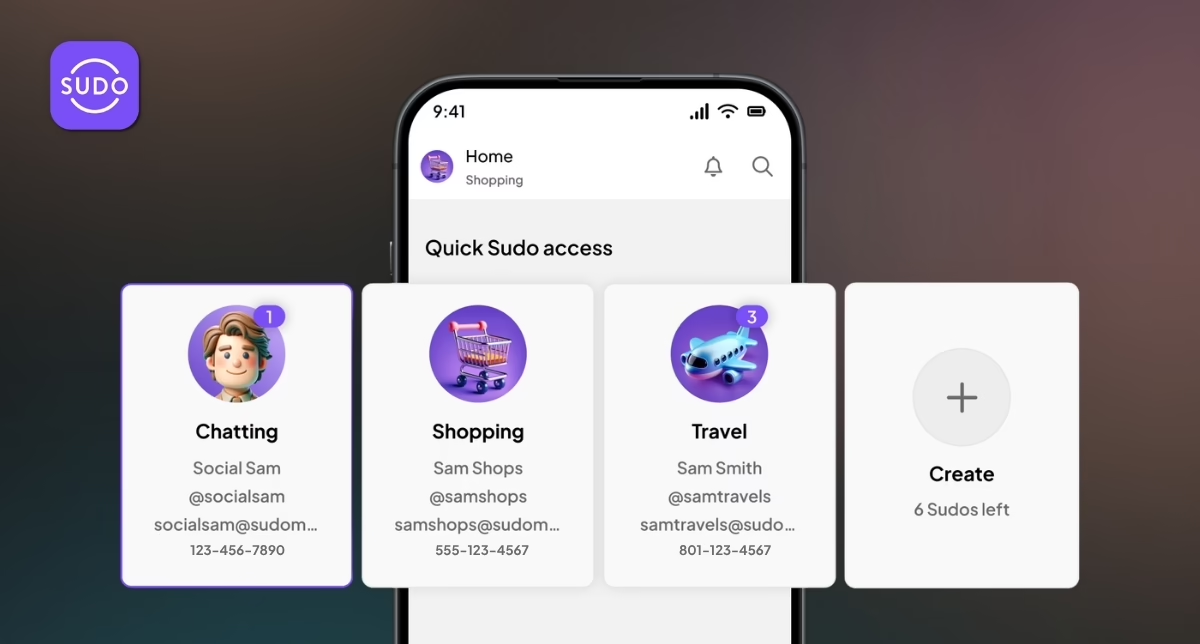
- Use separate identities for different activities (shopping, social, sign-ups, travel etc.). MySudo can help manage this in one place. MySudo is built around digital identities called Sudos and each Sudo has its own phone number, email, private browser, and optional virtual card, so you don’t have to share your personal details at all.
But remember, you don’t need to do everything. Even a few changes in the first category will noticeably reduce how much companies can track you, and each additional layer makes you harder to profile.
How to stop data brokers selling your information
To reduce or stop data brokers from collecting and selling your personal information, the goal is to limit what data is available about you and actively remove what’s already been collected across major broker databases:
- Opt out of major data broker sites: Identify large data brokers (such as people-search and marketing databases) and submit formal opt-out or deletion requests where available. This often needs to be done individually per company.
- Use automated removal services (if preferred): Services that manage opt-outs across multiple brokers can save time, although they usually require some level of personal data to operate on your behalf.
- Search for yourself online regularly: Look up your name, email, phone number and address to see which sites are exposing your information, then request removal directly.
- Remove your data from people-search sites: Sites that aggregate public records (addresses, phone numbers, relatives) are a major source of broker data and usually offer opt-out forms.
- Reduce data sharing at the source: Avoid giving unnecessary personal details when signing up for services, entering competitions, or filling out online forms.
- Use separate contact details: Consider using different emails or phone numbers for sign-ups so your core identity is harder to aggregate. Apps like MySudo can help create and manage multiple digital identities for different purposes.
- Opt out of marketing permissions: Where possible, uncheck marketing consent boxes and unsubscribe from mailing lists that may feed into data broker ecosystems.
- Remove your information from old accounts: Delete unused accounts and update old profiles that may still be publicly indexed or shared.
- Use privacy settings on social media: Lock down visibility of personal details like birthday, location, workplace, and contact info, which brokers often scrape or purchase indirectly.
- Consider a PO box or address masking service: This reduces the exposure of your home address in public records and marketing databases.
- Repeat removals periodically: Data brokers can re-collect information over time, so opt-outs often need to be refreshed every few months.
Even with these steps, complete removal is difficult because data brokers continuously recompile information from new sources. However, consistent opt-outs and reduced data sharing significantly shrink your digital footprint over time.
What is a VPN and do you need one?
A VPN (virtual private network) encrypts your internet traffic between your device and a secure server, helping protect your activity from your internet provider and others on the same network. It also replaces your IP address with the VPN server’s, which can improve privacy and help access region-restricted content. However, a VPN does not make you anonymous: websites and apps you log into (like Google or Facebook) can still track your activity directly.
You may benefit from a VPN if you regularly use public Wi-Fi, work remotely with sensitive information, or want an extra layer of privacy while browsing.
How to improve browser privacy and stop online tracking
Most mainstream browsers balance privacy with convenience and compatibility, so how private you are online depends a lot on how you set things up. Private or “incognito” mode is often misunderstood; it stops your browser from saving your history, cookies, and form data on your device, and deletes that session data when you close the window. Your internet provider, workplace network, and the websites you visit can still see what you’re doing.
Some browsers are designed to reduce tracking more by default, blocking many ads and third-party trackers and limiting how much data websites can collect about you. While this can noticeably improve privacy, no browser can make you completely invisible online.
Another big issue is browser fingerprinting, where websites identify you based on details like your device, screen size, fonts, language, and time zone. Even without cookies, this can often be used to track you across sites.
To improve your privacy, it helps to turn on stronger tracking protection, block third-party cookies, and use trusted tools that reduce ads and trackers. Clearing cookies regularly or separating different types of browsing (for example, work vs personal) can also make a difference.
Logging into accounts (like Google or social media) can still allow those services to track your activity regardless of browser settings.
You can also reduce tracking by choosing a more privacy-focused search engine instead of one that builds detailed profiles based on your searches. It won’t make you anonymous, but it does reduce how much data is collected over time.
How to create strong passwords and manage them safely
Most people still reuse the same passwords across multiple accounts, which is risky given how often data breaches happen. Even if you haven’t been directly affected, it’s very likely that at least one of your logins has been exposed somewhere along the way.
The easiest way to fix this is to use a password manager. It creates strong, unique passwords for every site, stores them securely in an encrypted vault, and fills them in automatically when you log in. That means you only need to remember one strong master password.
Your master password should be a passphrase, which is a string of four or more random words that’s long, memorable, and hard to guess. The goal is simplicity for you, and unpredictability for everyone else.
Follow these simple tips:
- Don’t reuse passwords across different sites, even if they seem low risk.
- Avoid anything personal or easy to guess, like names or birthdays.
- Check whether your email has appeared in known breaches using reputable breach-checking tools.
- Treat your email account as the priority; if it’s compromised, it can be used to reset access to almost everything else.
Think of your email as the “master key” to your online life. If that one is well protected, everything else becomes much easier to secure.
What is 2FA and should you use it?
Two-factor authentication (2FA) adds an extra step when you log into an account, requiring a second form of verification in addition to your password. This usually means a code generated on your phone, a push notification, or a physical security key. Even if someone steals your password, they still can’t access your account without this second factor.
SMS-based codes are the most basic form of 2FA but are more vulnerable to SIM-swapping attacks. Authenticator apps are more secure because they generate time-based codes directly on your device, while hardware security keys offer the strongest protection and are highly resistant to phishing.
You should use 2FA on all important accounts, especially email, banking, and any service connected to your identity or financial information.
Social media privacy settings: a platform-by-platform guide
Most social platforms are designed to encourage sharing and visibility by default. Adjusting a few key settings can significantly reduce how much data you expose:
Facebook – Review privacy settings and set posts to Friends or a limited audience. Limit how people can find you using your email or phone number, and review which third-party apps have access to your account. You can also limit how activity from other websites is used.
Instagram – Switch your account to private if you don’t want public visibility. Review ad and data settings, check which external apps are connected, and control who can message, tag, or mention you.
TikTok – Consider setting your account to private, limiting who can interact with your content, and reviewing ad personalization settings. Check location access in your device settings and use in-app tools to access or delete your data.
LinkedIn – Adjust visibility settings to control what others can see about your profile and activity. Review how your data may be used for product improvement or AI features, where available.
X (formerly Twitter) – Enable protected posts (private account) if needed. Turn off discoverability via email or phone number, and review connected apps and third-party access.
Many platforms now offer “Privacy Checkup” tools that walk you through the most important settings. They’re a quick way to cover the basics, but it’s still worth going into the full settings menu to review more detailed privacy controls.
Even with stricter settings, platforms still collect data about your activity while you’re logged in.
Across all platforms, it’s a good idea to review connected apps every few months and remove anything you no longer use. Privacy settings also change over time, so it’s worth re-checking them periodically rather than setting and forgetting.
How to protect yourself from identity theft and deepfakes
AI is making identity fraud more convincing and easier to scale. Scammers can now mimic voices, generate realistic video, and create fake documents that can sometimes pass basic automated checks.
One of the most effective protections in the US is a credit freeze. Placing a freeze with Experian, Equifax, and TransUnion prevents new credit accounts from being opened in your name. It’s free, but you need to set it up with each bureau individually. It won’t stop fraud on existing accounts, so you still need to monitor those closely.
You can check your credit report for free at AnnualCreditReport.com (now available weekly), and it’s worth setting up transaction alerts on all your financial accounts so you’re notified of unusual activity right away.
For deepfake scams, urgency is usually the biggest warning sign. If you receive a call, voice message, or video asking for money or sensitive information, especially if it feels rushed, pause and verify it through a separate channel. Call the person back on a number you trust, not the one provided.
Some families also use a simple “safe word” or verification question that only they would know. It sounds basic, but it’s surprisingly effective against AI impersonation.
It also helps to limit what’s publicly available about you. Voice clips, videos, and personal details shared online can all be used to make scams more convincing, so reducing your exposure where you can adds another layer of protection.
If you think you’ve been targeted or become a victim, act quickly. Report it to IdentityTheft.gov, contact your bank immediately, secure your accounts, and consider placing a credit freeze if you haven’t already. Early action can significantly limit the damage.
2-minute identity theft protection checklist
If you only have a couple of minutes, these are the highest-impact steps to reduce your risk right now:
- Freeze your credit with Experian, Equifax, and TransUnion to stop new accounts being opened in your name.
- Turn on two-factor authentication (2FA) for your email, banking, and primary accounts.
- Set up transaction alerts on all financial accounts so you’re notified instantly of unusual activity.
- Check your credit report at AnnualCreditReport.com for unfamiliar accounts or inquiries.
- Lock down your email account with a strong password and recovery options; it’s the gateway to everything else.
- Remove unused apps and accounts that still have access to your data.
- Limit what’s public on your social media profiles, especially contact details and personal identifiers.
- Create a simple “safe word” with family to verify urgent requests and avoid deepfake scams.
These steps won’t make you invisible, but they dramatically reduce the chances of identity theft and help you catch problems early.
Best privacy apps and tools 2026
Here are all the tools you need for strengthening your privacy across key areas:
- Private browsers: Privacy-focused browsers with built-in tracking protection and cookie blocking
- Private search tools: Search engines that minimize tracking and profiling of your queries
- VPNs: Services that encrypt your internet traffic and hide your IP address on public networks
- Password managers: Tools that generate and store unique passwords for every account
- Two-factor authentication (2FA): Apps and hardware keys that add an extra login step beyond your password
- Secure messaging: End-to-end encrypted messaging apps for private conversations
- Private email services: Email providers focused on reducing tracking and data collection
- Browser privacy extensions: Tools that block ads, trackers, and unwanted cookies
- Data broker removal services: Tools that help request removal of your personal data from people-search and marketing databases
- Breach monitoring services: Services that alert you if your email or passwords appear in known data breaches
- Temporary or masked email tools: Disposable email addresses for sign-ups and one-off services
- Device privacy controls: Built-in settings on your phone or computer to limit ad tracking, location sharing, and app permissions
- Encrypted cloud storage: Services that store files in a way that limits third-party access
How MySudo can help protect your online privacy in 2026
If you want better online privacy without getting overwhelmed, MySudo covers a lot of what’s on this list.
MySudo helps you create and manage separate digital identities called Sudos in one place, so you can reduce how often your personal details are exposed online.
Each Sudo can have its own private alternative phone number, email, browser, and virtual card to use instead of your personal ones. What’s more, MySudo lets you have up to 9 phone numbers on one device, MySudo email is better than masked email, and you can use MySudo phone numbers to call internationally for free.
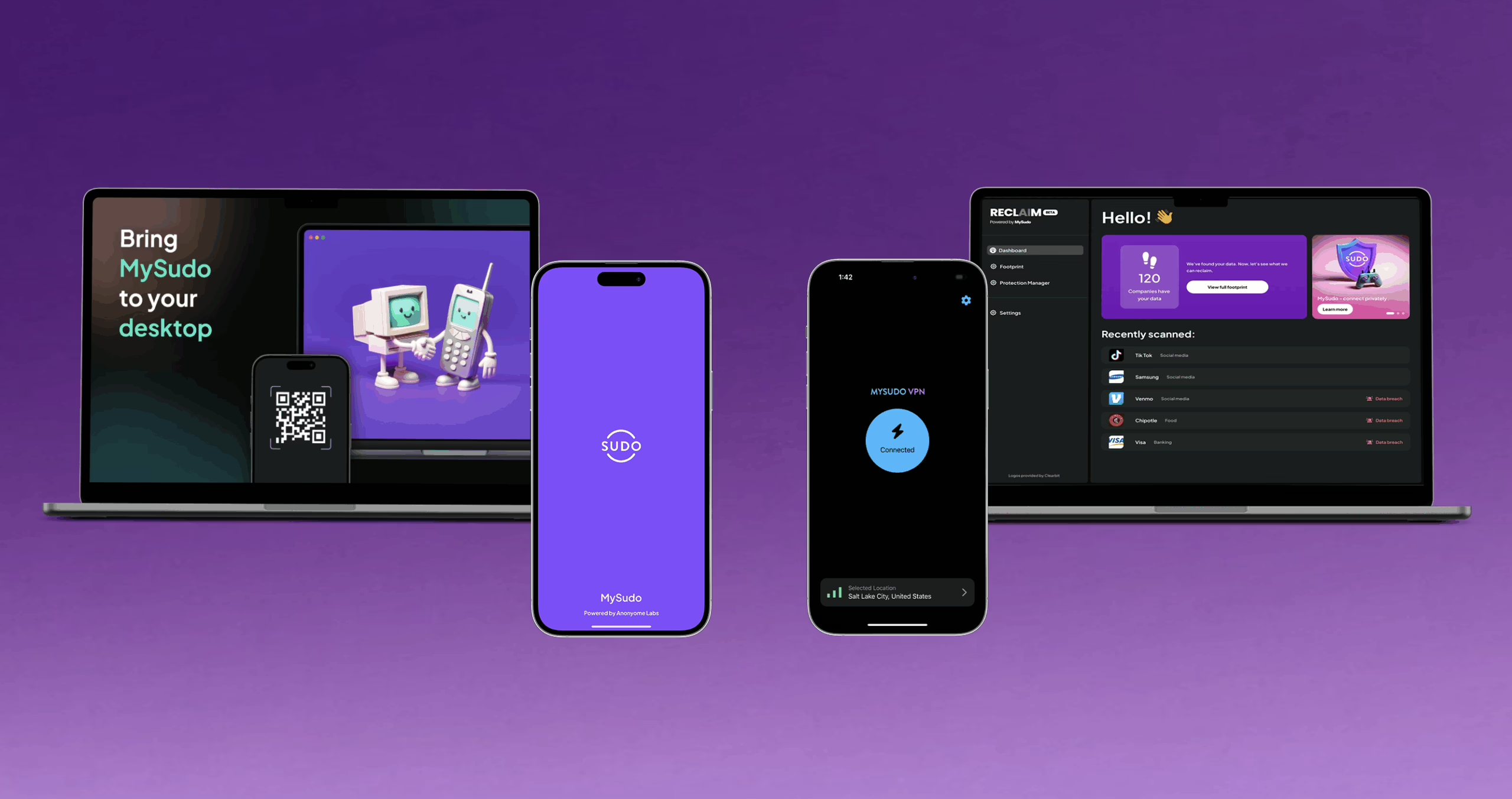
Explore MySudo Reclaim, a companion tool for taking back your personal information. See your digital footprint, discover data breaches, and reclaim control.
Explore MySudo VPN, to encrypt your internet connection with the VPN that’s truly private.
See the full MySudo suite.